
Add a Bedrock account
Connect an Xbox/Microsoft account using Auth Code or a supported JSON export.
Check Bedrock connection details
Open Settings → Connection and enter the server’s Bedrock address, port, and a supported Bedrock version. Bedrock uses a separate connection from Java. Choose a proxy listed as supporting Bedrock; your own proxy must be SOCKS5 with UDP support, because HTTP and HTTPS proxies only carry TCP.
Use Auth Code
Choose Bedrock
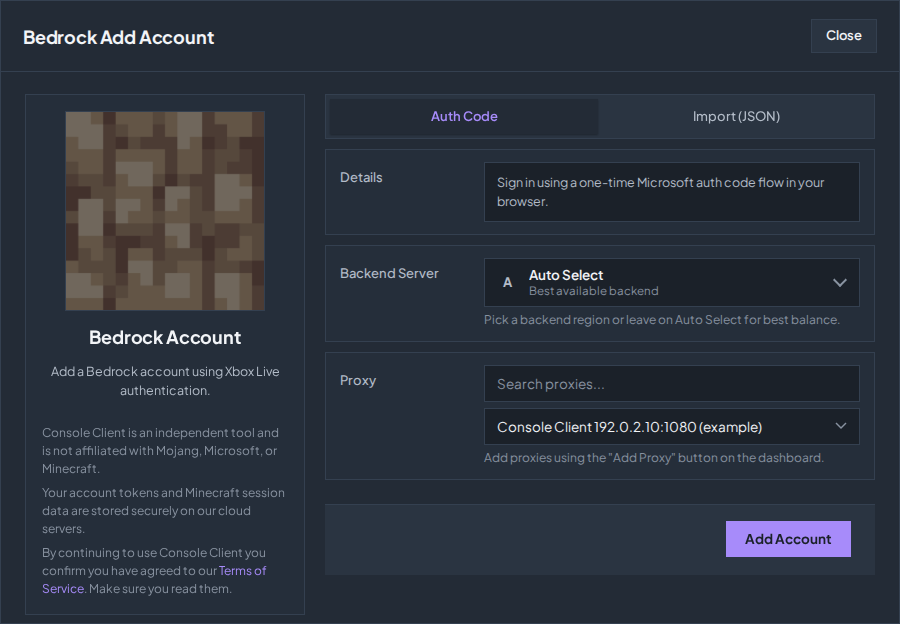
Open Overview → Add Account → BEDROCK.
Choose Auth Code and a proxy
Choose Auth Code and select your proxy. You choose your Xbox/Microsoft account during the Microsoft sign-in prompt.
Add and authenticate
Click Add Account, then GENERATE CODE in the Microsoft Login prompt. Click Open Microsoft Login and sign in with the intended Xbox account. Return to Overview and use Connect when ready.
Verify the server connection
Check the status in Overview and the messages in Chat. A Java server with a Bedrock bridge may display your gamertag with a prefix; use the name that server displays.
Import a JSON export
In the Bedrock form, choose Import (JSON), then Select JSON file(s). Choose compatible Bedrock account exports, select a proxy or the available Auto Fill options, and click Import Bedrock Accounts. A JSON filename alone does not make a file compatible: it must contain the supported account export data.
Nintendo Switch and Android exports are supported, and iOS exports that name their platform. Console Client recognizes which platform each account signs in as and keeps using it. In Overview an Android account shows an ANDROID tag next to BEDROCK; AUTO means the platform is confirmed on the first connect. Files for other platforms are skipped, and the import result says how many.
Check the troubleshooting guide or return to all guides.