
Set up combat and aura
Choose which accounts fight, what they may target, and which gear they equip themselves.
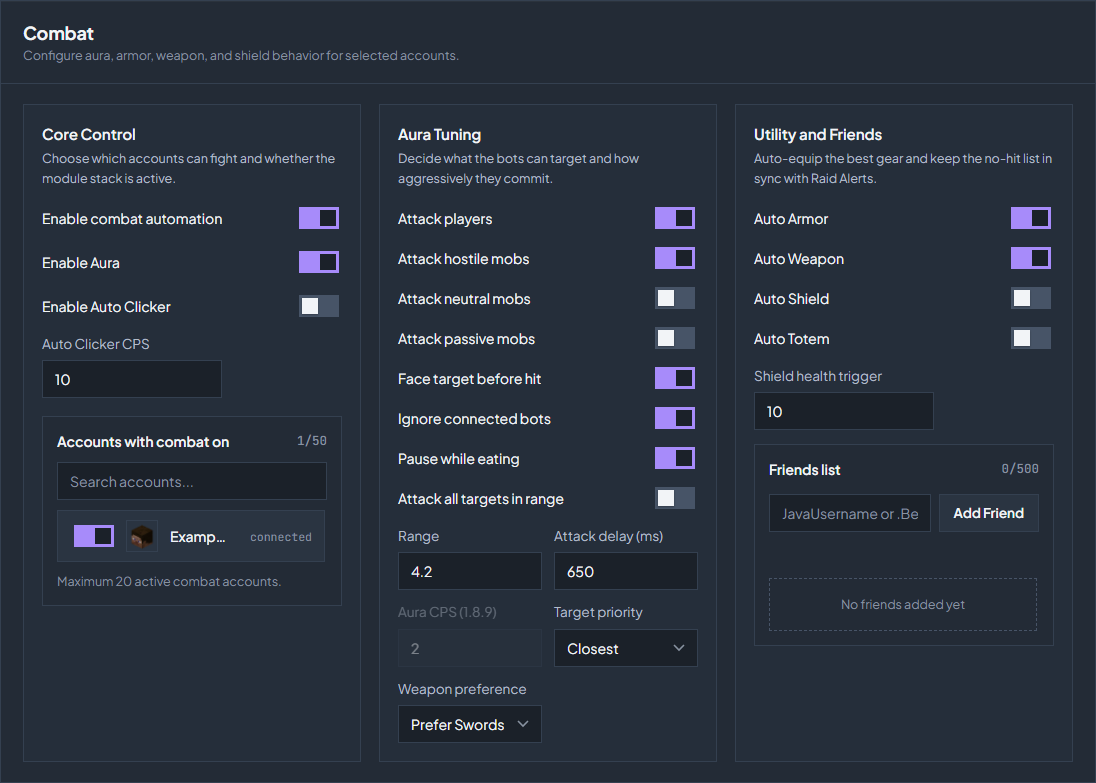
Turn combat on for chosen accounts
Open Control → Combat. Combat unlocks on Tier 3 with 20 or more account slots.
Enable the stack
Turn on Enable combat automation. Nothing fights until this is on.
Pick the accounts
Select the accounts under Accounts with combat on. The counter beside that heading shows how many of the allowed accounts you have used.
Choose the modules
Enable Aura attacks targets around the account. Enable Auto Clicker clicks at the Auto Clicker CPS you set, whether or not a target is found.
Decide what it may hit
Aura Tuning controls targeting. Start narrow, watch one account, then widen it.
| Setting | What it changes |
|---|---|
| Attack players / hostile / neutral / passive mobs | The categories the aura is allowed to hit. Neutral and passive are off by default so an account does not start a fight with something harmless. |
| Ignore connected bots | Keeps your own connected accounts off the target list. Leave this on when several of your accounts stand together. |
| Range | How far a target may be, from 2.5 to 6 blocks. A range beyond normal reach is the kind of thing an anti-cheat looks for. |
| Attack delay (ms) and Aura CPS (1.8.9) | How often a hit is sent. The CPS field applies on 1.8.9 style servers. |
| Target priority | Closest, Players First, or Lowest Health. |
| Attack all targets in range | Hits every valid target instead of one at a time. This is the most obvious setting here. |
| Face target before hit | Turns the account towards the target first, which looks far more like a player than hitting behind you. |
| Pause while eating | Stops attacking while the account is eating, so Auto Eat can finish. |
Gear, shields, and friends
Utility and Friends keeps equipment up to date without you clicking through the inventory.
| Setting | What it does |
|---|---|
| Auto Armor | Equips the best armour the account is carrying. |
| Auto Weapon | Equips a weapon according to Weapon preference: Prefer Swords, Prefer Axes, or Max Damage. |
| Auto Shield | Puts a shield in the off hand. |
| Auto Totem | Keeps a totem in the off hand instead. Choose one of the two for an account, not both. |
| Shield health trigger | The health at which the shield is raised. |
| Friends list | Names the aura will not attack, up to 500. This is the same list Raid Alerts uses, so a name added here is also treated as known there. MineProbe, an automated DonutSMP account, is never attacked and never raises your shield, even without being on the list. |
Test it before you rely on it
Combat sends real attacks. Check your server’s rules first: many servers forbid automated combat, and an anti-cheat can flag a high CPS, a long range, or attacks on targets behind the account. Enable it for one account, watch what it hits in Point of View, then widen the account list.
Check the troubleshooting guide or return to all guides.