
Send a message list with Chat Spammer
Loop a list of messages across selected accounts, with delays, ordering, and a stop time.
Build the message list
Open it
Go to Chat → Chat and click Open Chat Spammer.
Select accounts
Use Select accounts… to choose which connected accounts send the messages.
Add messages
Type a message and add it to the list. You can queue up to 50, and the counter shows how many you have used.
Start
Click Start Spam. The panel then shows Run, Sent, Elapsed, and Ends in while the job is live.
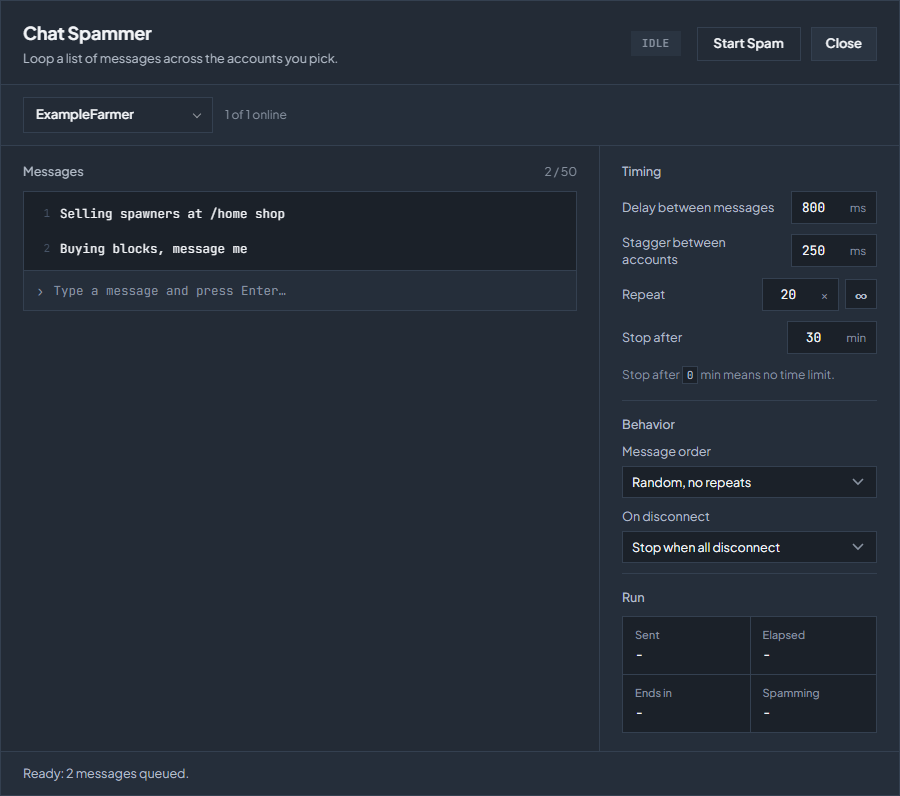
Timing
| Setting | What it controls |
|---|---|
| Delay between messages | The wait between one message and the next, in milliseconds. Set it above your server’s chat cooldown or messages are dropped. |
| Stagger between accounts | The offset between accounts, in milliseconds, so they do not all send on the same tick. |
| Repeat | How many times to run through the list. |
| Stop after | A time limit in minutes. 0 means no time limit, so the job runs until it finishes its repeats or you stop it. |
Order and disconnects
| Setting | Choices |
|---|---|
| Message order | Random, no repeats works through the list in a shuffled order before repeating any message. Random picks freely. In order follows the list top to bottom. |
| On disconnect | Stop when all disconnect ends the job once no selected account is left online. Stop when any disconnects ends it as soon as one drops. Keep running, auto-resume leaves the job live, and an account rejoins the run when it reconnects. |
A running job survives a node restart and picks up again on its own, so stop it in the panel when you are finished rather than leaving it to expire.
Stay within the server’s rules
Chat spam is against the rules on many servers and is a fast way to be muted or banned. Check what your server allows, keep the delay comfortably above its cooldown, and start with one account and a short run before using a larger group.
Check the troubleshooting guide or return to all guides.