
Set up Sell Axe Auto Sell
Position your account at a chest, return with /home 1, and hold both mouse buttons with shift.
Position the account first
Use a Java or Bedrock account and a plan that unlocks Auto Sell. Give the account the server’s sell axe and make sure it can use the chest.
Teleport in front of the chest
Teleport the account in front of a chest and have it look directly at the chest, within interaction reach. Sell Axe uses the chest the account is looking at.
Set a home there
Have the account set a home in this position, using your server’s home command. Keep its view pointed at the chest when you save the home.
Set the join command
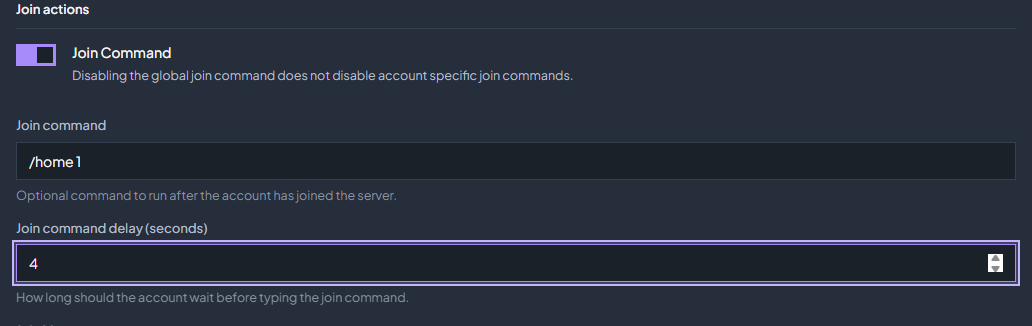
Open Settings → Behavior, enable Join Command, and enter
/home 1. Set a join delay that allows the server to load. Test that the command returns the account to the chest with the right view.
Choose Sell Axe and configure the buttons
Open the Sell Axe mode
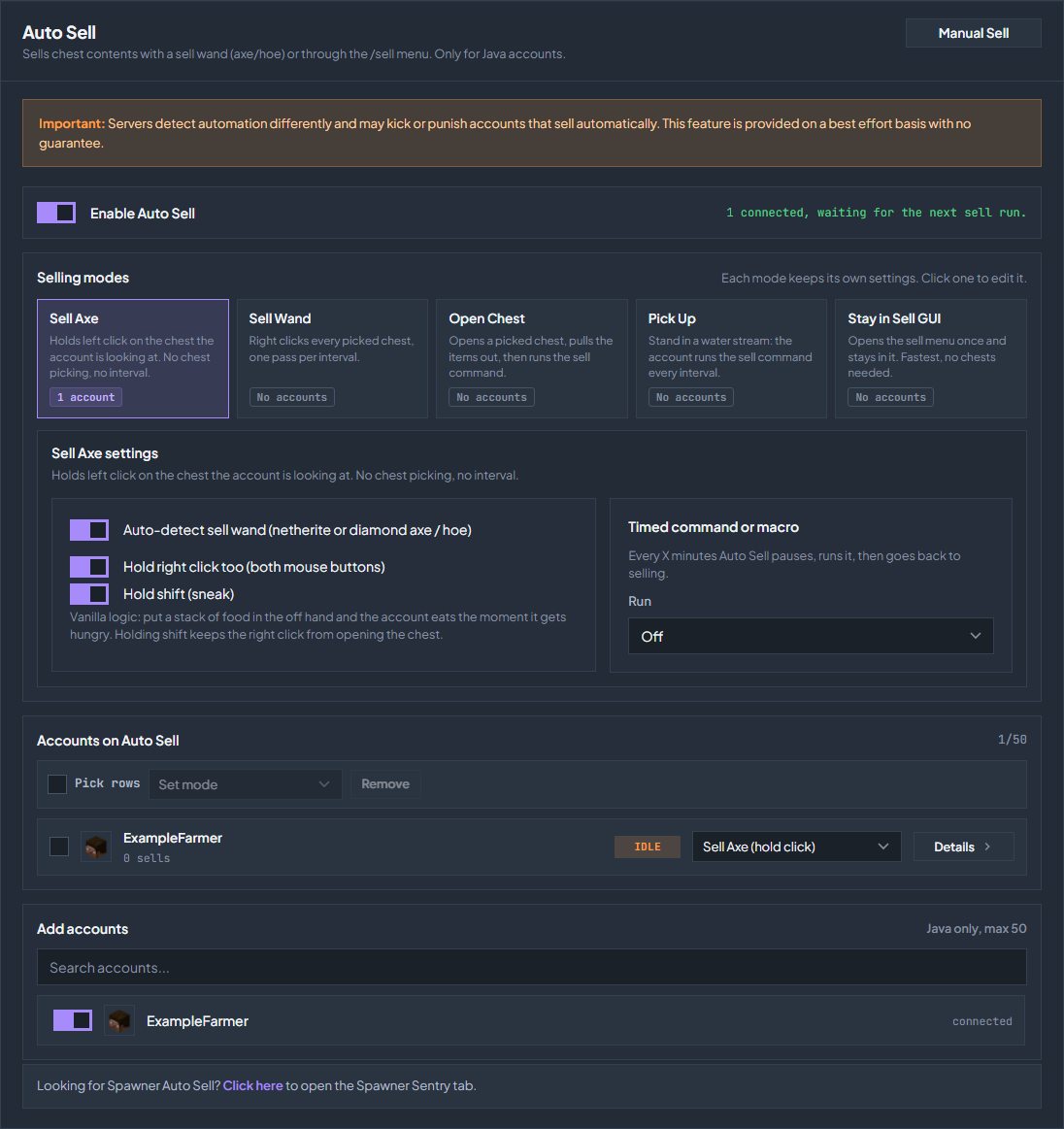
Go to Auto Sell in the sidebar. Under Selling modes, click Sell Axe. Each mode keeps its own settings.
Check the sell axe
Leave Auto-detect sell wand (netherite or diamond axe / hoe) on if it selects the correct tool. Confirm the account has the actual server sell axe, not just an ordinary axe. If auto-detection is off, equip the correct tool yourself.
Hold both buttons and shift
Enable Hold right click too (both mouse buttons) and Hold shift (sneak). Sell Axe already holds left click. Keep shift enabled so right click uses the item in the off hand instead of opening the chest.
Add food for vanilla auto eat
Put a stack of food in the off hand and keep the sell axe in the main hand. Holding both mouse buttons uses vanilla Minecraft behavior: left click keeps the axe working on the chest, while right click lets the account eat from its off hand when hungry. Keep Hold shift (sneak) enabled so the chest does not open, and replenish the food when it runs out. Bedrock accounts cannot eat from the off hand, so give them food in the inventory and turn on Auto Eat instead.
Assign your account
Find the account under Add accounts and add it. In Accounts on Auto Sell, verify that its assigned mode is Sell Axe.
Enable Auto Sell
Turn on Enable Auto Sell. Wait for the save confirmation and verify that the account sells from the chest. Use server messages or the balance change to confirm an actual sale.
What happens while it runs
Sell Axe continuously holds left click against the chest in front of the account. It does not use a chest selection list or a sell interval. Keep the chest within reach and the account aimed at it. Other Auto Sell modes work differently; see the mode guide.
Water stream support
Console Client accounts work perfectly with water streams. Watch the video below for an example of Sell Axe Auto Sell in a water-stream setup.
If it is not selling
| What you see | What to check |
|---|---|
| The chest opens instead | Enable Hold shift (sneak) when holding right click. Close the open menu. |
| The account does nothing | Check Enable Auto Sell, account assignment, Sell Axe mode, and connected status. |
| It swings but does not sell | Check the actual sell axe, chest contents, distance, view direction, and server permissions or cooldowns. |
| It stops working after reconnect | Test /home 1 and the join delay; check that the account returns facing the chest. |
| It goes quiet after a DonutSMP region reboot | Set a Recovery command in the Sell Axe settings, such as /home 1. It runs once when break attempts keep going unanswered after a reboot. Leave it blank to disable it. |
Turn off Enable Auto Sell when you want to stop automatic selling. Server restrictions can interrupt automation; validate the setup on your own account.
Check the troubleshooting guide or return to all guides.