
Automate clicking with Mouse Control
Set a click action per account, hold to mine or use, and watch what each crosshair is on.
Choose the accounts
Open Control → Mouse. Mouse control unlocks on Tier 2 with 10 or more account slots and works for both Java and Bedrock accounts.
Aim first
Put each account where it should click and point it at the target, using Head Position or Point of View. The mouse controller clicks what the account is already looking at; it does not aim for you.
Turn it on
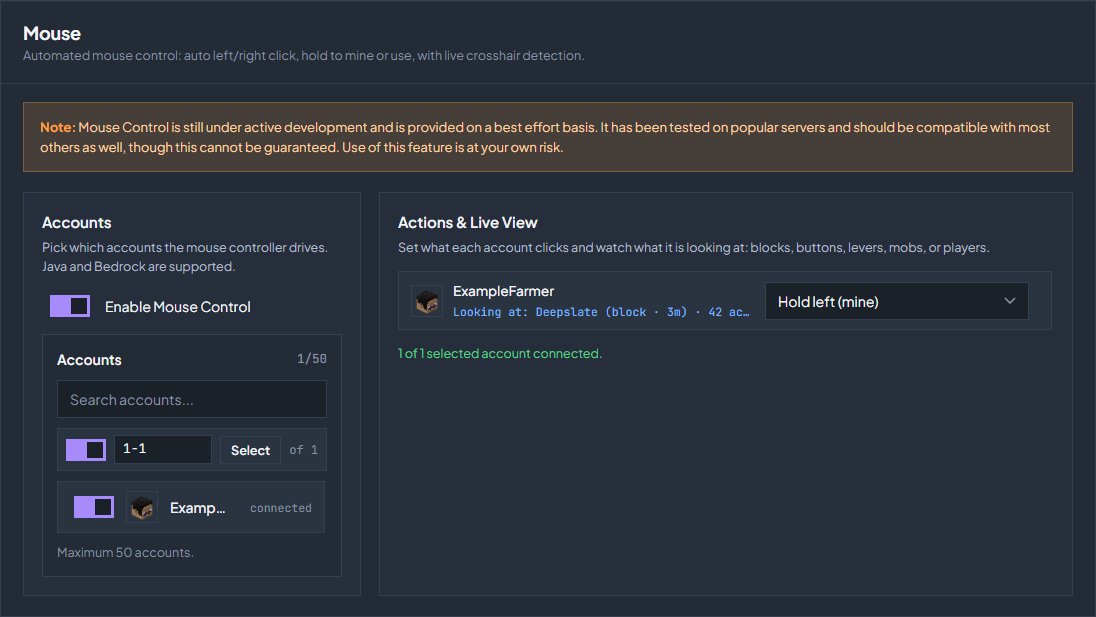
Enable Mouse Control, then select accounts in the Accounts list. The counter shows how many of the allowed accounts you have used.
Set an action per account
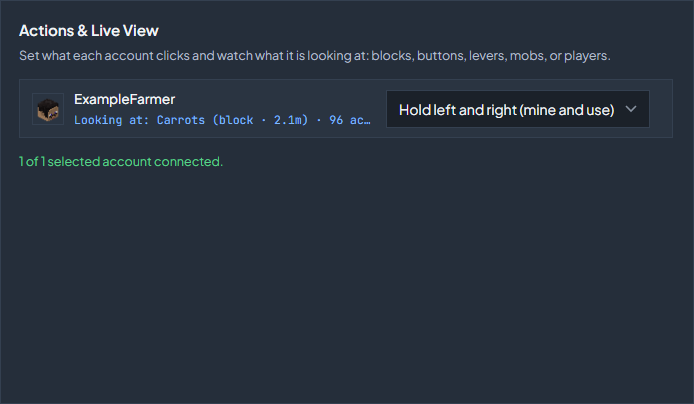
Each selected account gets its own row under Actions & Live View. The row also shows what the account is currently looking at, so you can confirm the aim before you let it click.
The actions
| Action | What it does |
|---|---|
| Scan only (no clicks) | Reports what the account is looking at and clicks nothing. Use this to check aim. |
| Left click | A single left click, repeated. |
| Right click | A single right click, repeated. This is the one for buttons, levers, and menus. |
| Hold left (mine) | Holds the left button down, which is how you break a block you are already facing. Like a player, blocks that break in one hit, such as crops, grass, and flowers, are broken every game tick, and harder blocks take their normal time. |
| Hold right (use) | Holds the right button down, for a continued use action. |
| Hold left and right (mine and use) | Holds both buttons at once, the way a player would, every game tick. The right click (placing, planting, using) goes first, repeats every fourth tick, and waits while a block is still being broken, and the left click keeps breaking unless the account is using something, such as eating, drawing a bow, or raising a shield. |
The live view names what is under the crosshair: a block, a button, a lever, a mob, or a player. If it names something you did not expect, fix the aim before changing the action.
Example: a crop farm
Hold left and right breaks the crop in front of the account as soon as it is there, and plants a new one when the cell is empty and nothing is being broken. On Java, keep the main hand empty or hold a hoe, and put the seeds, carrots, or potatoes in the off hand. On Bedrock the off hand cannot plant, so put them in the main hand.
Stand next to the farm
Place the account beside the farmland, close enough to reach it.
Aim down at the crop
Point the crosshair at the crop you want, with the farmland right below it. A level view looks past the crop at whatever is behind it, and a right click on the side of a crop cannot plant.
Pick the action
Set the account to Hold left and right (mine and use). In Point of View you can also turn on both click buttons.
What to expect
Mouse Control is still under active development and is provided on a best effort basis. It has been tested on popular servers and should work on most others, but that cannot be guaranteed, so use it at your own risk and test with one account first.
Check the troubleshooting guide or return to all guides.